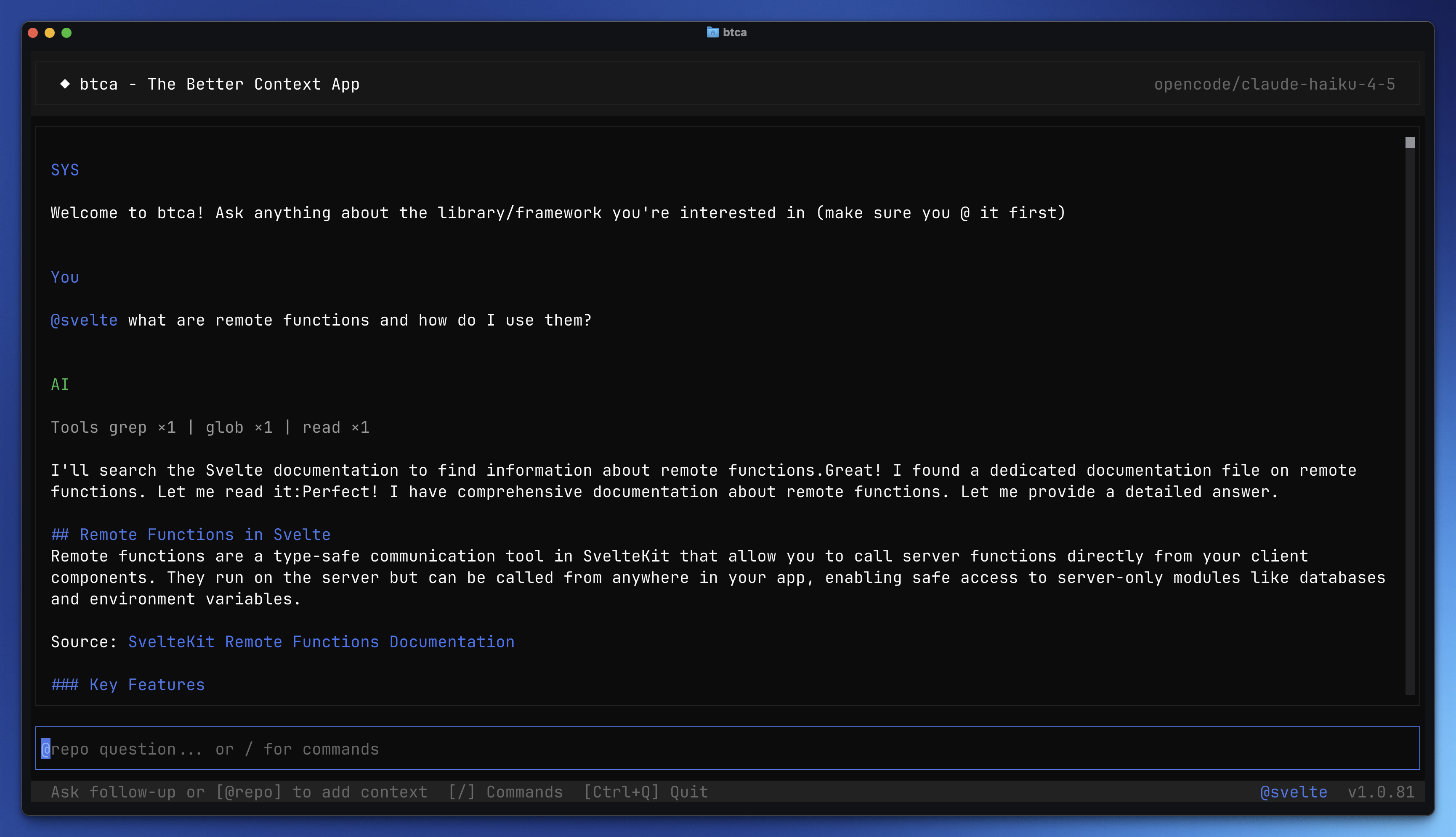
CLI

Ship answers from the real source.

The CLI clones repos locally, searches code, and returns citations. It is fast, private, and terminal-first.

Step 1 · Install

Install btca and the OpenCode SDK globally.

bun add -g btca opencode-ai
Step 2 · Add a resource

Add the Convex JS repo as your first resource. View repo.

btca config resources add --name convex --type git --url https://github.com/get-convex/convex-js --branch main
Step 3 · Ask a question

Use the resource to see a real answer.

btca ask --resource convex --question "How do I create a Convex mutation and use it in a React app?"
Project setup

Copy this prompt into your AI coding agent to generate a tailored btca.config.jsonc for your repo.

Setup Prompt
Set up btca (Better Context) for this project by following these steps:

## Step 1: Scan Dependencies

Check package.json (or equivalent package manager files) and identify libraries/frameworks that would benefit from btca integration. Look for:

- **Frameworks**: Svelte, React, Vue, Next.js, Nuxt, SvelteKit, Remix, Astro
- **Backend**: Effect, Hono, Express, Fastify, tRPC
- **Styling**: Tailwind CSS, UnoCSS
- **Tooling**: TypeScript, Vite, esbuild, Bun
- **Syntax**: Shiki, Prism
- **Other major libraries**: Drizzle, Prisma, Zod, etc.

## Step 2: Present Full Resource List

After scanning, show me the **complete list** of suggested resources in a simple format:

```
Found these dependencies that would benefit from btca:

1. svelte - Svelte framework docs and source
2. tailwind - Tailwind CSS documentation
3. effect - Effect-TS library docs
4. drizzleOrm - Drizzle ORM documentation
... etc

Note: Resource names should be camelCase (e.g., drizzleOrm, not drizzle-orm).

Does this list look good, or would you like to add/remove any?
```

**Wait for my confirmation before proceeding.** I might say:

- "Looks good" - proceed with all
- "Remove X and Y" - exclude those
- "Add Z" - include additional ones

## Step 3: Show Prepared Config

Once I approve the resource list, prepare the full `btca.config.jsonc` with sensible defaults and **show it to me before writing any files**:

```jsonc
{
	"$schema": "https://btca.dev/btca.schema.json",
	"resources": [
		{
			"name": "svelte",
			"type": "git",
			"url": "https://github.com/sveltejs/svelte.dev",
			"branch": "main",
			"searchPath": "apps/svelte.dev",
			"specialNotes": "Svelte docs website. Focus on content directory for markdown docs."
		},
		{
			"name": "tailwind",
			"type": "git",
			"url": "https://github.com/tailwindlabs/tailwindcss.com",
			"branch": "main",
			"searchPath": "src/docs"
		}
		// ... all approved resources
	],
	"model": "claude-haiku-4-5",
	"provider": "opencode",
	"providerTimeoutMs": 300000
}
```

Ask: "Here's the config I'll create. Want me to change anything before I write it?"

**Wait for approval** before creating files. I might want to:

- Change a repo URL
- Adjust a searchPath
- Add specialNotes
- Change branch names

## Step 4: Create Files

Only after I approve the config:

1. Create `btca.config.jsonc` in the project root
2. Add `.btca` to `.gitignore` (create the file if it doesn't exist, or append if it does)

## Step 5: Ask About Usage Mode

Ask me which mode I want the agent to use btca in:

```
How would you like your AI agent to use btca?

1. **eager** - Agent uses btca automatically whenever it thinks it needs up-to-date info
2. **ask** - Agent asks you first before using btca to research
3. **lazy** - Agent only uses btca when you explicitly say "use btca" in your prompt

Which mode? (eager/ask/lazy)
```

**Wait for my response** before updating AGENTS.md.

## Step 6: Update AGENTS.md

Check if an `AGENTS.md` file exists in the project root:

- **If it exists**: Look for an existing `## btca` section and update it
- **If it doesn't exist**: Create `AGENTS.md` with the btca section

Add or update this section based on the chosen mode:

**For "eager" mode:**

```markdown
## btca

When you need up-to-date information about technologies used in this project, use btca to query source repositories directly.

**Available resources**: [comma-separated list of all resource names from config]

### Usage

\`\`\`bash
btca ask -r <resource> -q "<question>"
\`\`\`

Use multiple `-r` flags to query multiple resources at once:

\`\`\`bash
btca ask -r svelte -r effect -q "How do I integrate Effect with Svelte?"
\`\`\`
```

**For "ask" mode:**

```markdown
## btca

When you need up-to-date information about technologies used in this project, ask the user if they'd like you to use btca to research.

**Available resources**: [comma-separated list of all resource names from config]

### Usage

\`\`\`bash
btca ask -r <resource> -q "<question>"
\`\`\`

Use multiple `-r` flags to query multiple resources at once:

\`\`\`bash
btca ask -r svelte -r effect -q "How do I integrate Effect with Svelte?"
\`\`\`
```

**For "lazy" mode:**

```markdown
## btca

When the user says "use btca" for codebase/docs questions.

**Available resources**: [comma-separated list of all resource names from config]

### Usage

\`\`\`bash
btca ask -r <resource> -q "<question>"
\`\`\`

Use multiple `-r` flags to query multiple resources at once.
```

## Step 7: Provide Summary

After completing the setup, show me:

1. **Configured resources** (list with name, type, and URL/path)
2. **Config file location** (absolute path)
3. **AGENTS.md status** (created or updated, with which mode)
4. **Example commands** specific to my project's resources
5. **Next steps**:
   - "Resources will be cloned to `~/.local/share/btca/resources/` on first use"
   - "Use `btca clear` to remove cached git repositories if needed"
   - **If using Cursor**: Run this command to install the btca rule file:
     ```bash
     mkdir -p .cursor/rules && curl -fsSL "https://btca.dev/rule" -o .cursor/rules/better_context.mdc && echo "Rule file created."
     ```
Commands

The core CLI workflows, ready to copy.

btca

Launch the interactive TUI for multi-turn questions.

btca
btca ask

Ask a single question about configured resources.

btca ask --resource svelte --question "How does $state work?"
btca chat

Open a TUI session with saved history.

btca chat --resource svelte
btca serve

Start the local server for HTTP requests.

btca serve --port 3000
Configuration

Add resources and model details in btca.config.jsonc. You can place this in your project to define exactly what btca should search.

Example config
// Add a btca.config.jsonc file in your project to pin specific resources.
{
  "$schema": "https://btca.dev/btca.schema.json", // JSON schema for editor validation.
  "baseDir": ".btca", // Base directory for cache and local data.
  "model": "claude-haiku-4-5", // Default model used for completions.
  "provider": "opencode", // Provider for model access.
  "resources": [ // Repositories btca can search.
    {
      "type": "git", // Resource type (git repository).
      "name": "svelte", // Short name used in CLI commands.
      "url": "https://github.com/sveltejs/svelte.dev", // Repo URL to clone.
      "branch": "main", // Branch to search.
      "searchPath": "apps/svelte.dev" // Subdirectory to focus on.
    }
  ]
}